

Designing Accessible Backstage and Onstage Spaces

Designing Accessible Backstage and Onstage Spaces in Performing Arts Facilities
Strategies for Theatre Designers Grounded in Universal Design
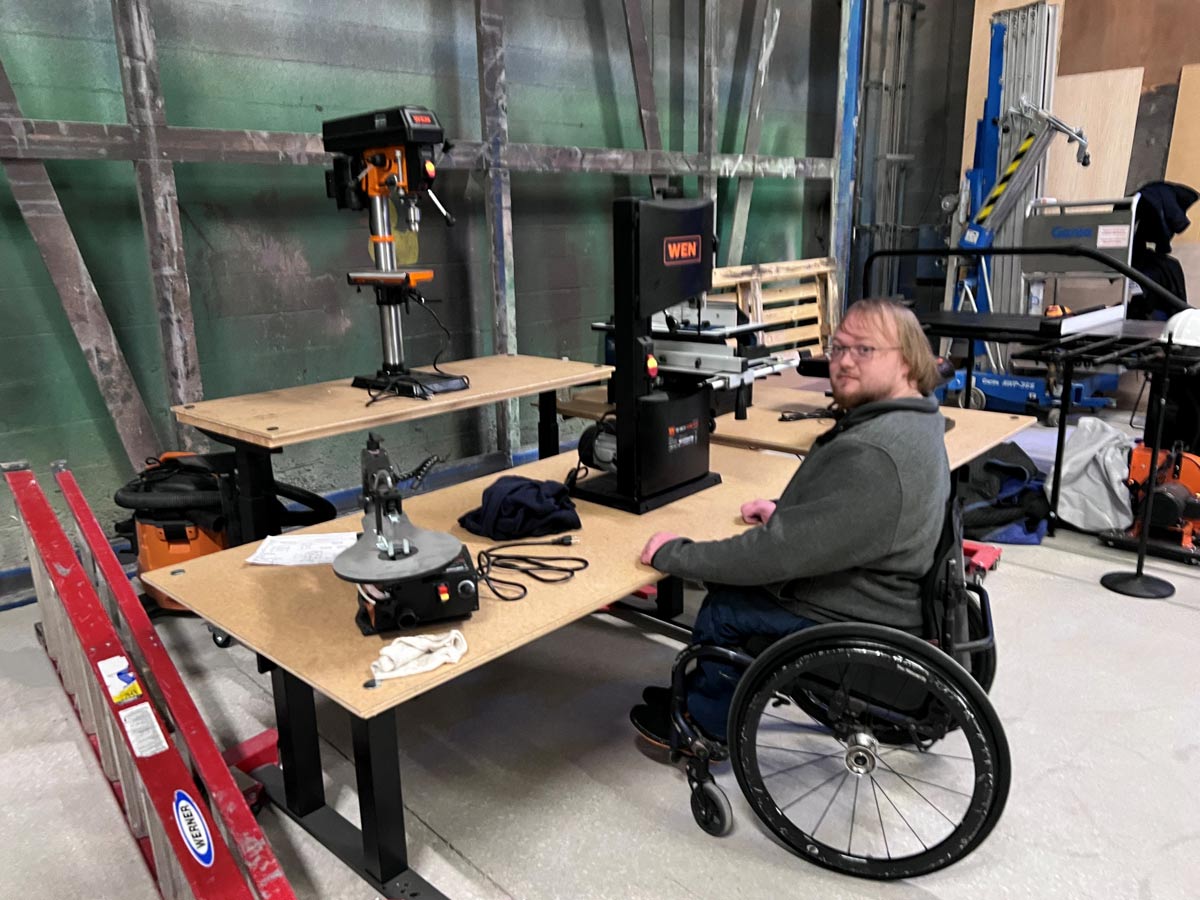
Adjustable height mobile worktables in the scene shop. (Photo by author)
Defining actionable strategies helps theatre designers to identify, design, and advise on accessibility across key backstage zones, integrating both architectural and technological solutions.
Universal Design: A Backstage Imperative
Universal Design (UD) goes beyond ADA compliance. It’s about creating environments that are usable by everyone, to the greatest extent possible, without the need for adaptation. For backstage spaces, this means:
- Anticipating diverse physical, sensory, and cognitive needs.
- Designing for flexibility, not just accommodation.
- Prioritizing dignity, independence, and seamless integration.
- Going beyond just checking a box.
Scene, Costume, and Prop Shops
These workspaces demand both safety and adaptability.
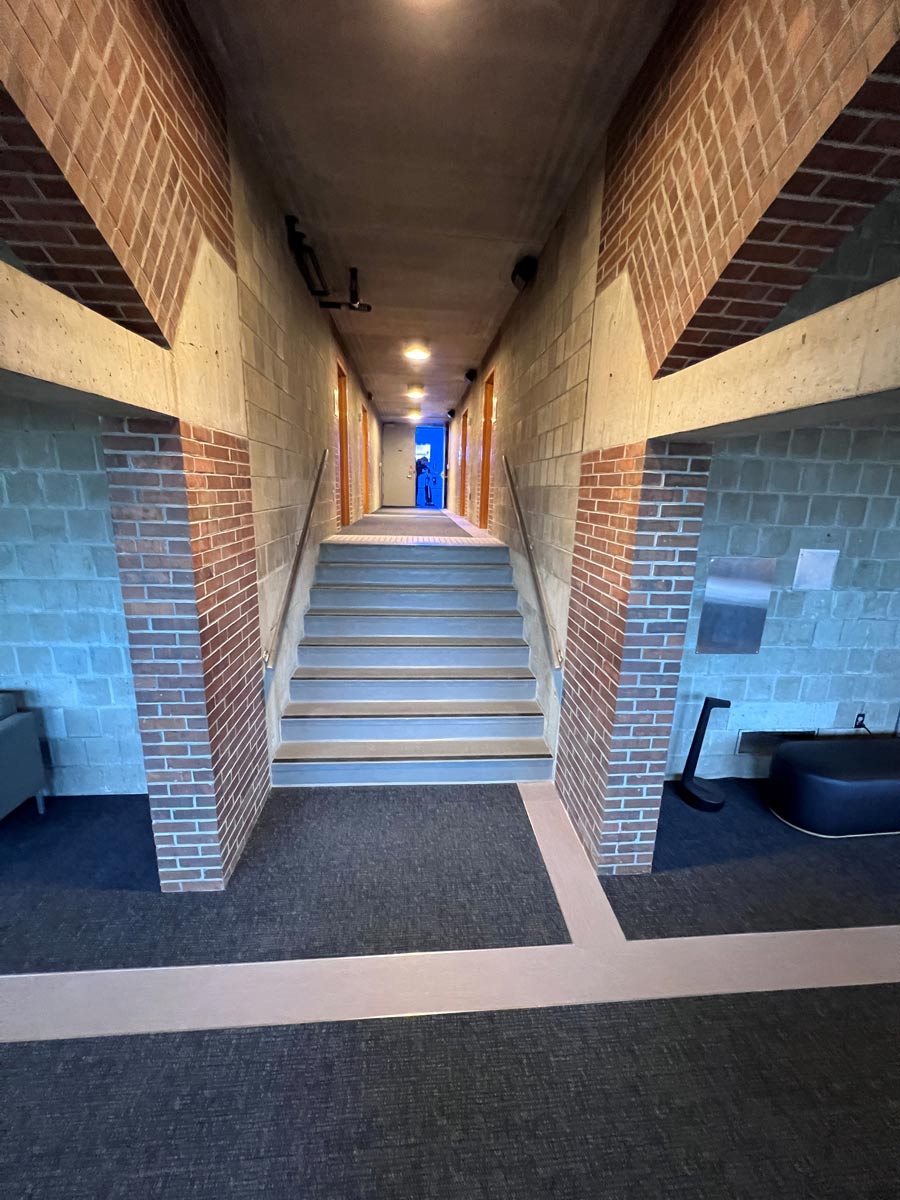
Cane trail and tactile floor indicators marking stairs and pathways around back of house corridors. (Photo by author)
- Adjustable height worktables and tooling: Enable seated or standing use for technicians with mobility limitations.
- Clear cane trails (a pathway using differing materials and a defined transition material that a person using a visual navigation device such as a cane can hear and feel the difference between the path and the adjacent flooring material. i.e.: Flooring – Carpet, pathway – LVT, transition – metal) and tactile floor indicators: Help visually impaired staff navigate safely around the facility, machinery and workstations.
- Auditory signaling systems: Use spatialized sound cues to indicate hazards or workflow zones.
- Ergonomic tool storage: Position tools within reach ranges for wheelchair users and those with limited dexterity.
- Lighting controls: Include dimmable and color-adjustable lighting to support neurodiverse technicians and reduce sensory overload.
- Lighting design that works to reduce glare, shadowing, or otherwise harsh conditions for visually impaired staff, volunteers, or crew.
Loading Docks and Pathways
Often overlooked, these areas are critical for safe and inclusive access.
Design Strategies:
- Level transitions and ramped access: Avoid thresholds or steps between dock and stage areas.
- Wide, unobstructed pathways: Minimum 48″ clear-path width within a corridor or room to accommodate mobility devices and rolling carts.
- Visual and tactile signage: Use high-contrast labels and Braille to identify zones and hazards.
- Weather protection and non-slip surfaces: Ensure safe access in all conditions.
Dressing Rooms and Greenrooms
These spaces should foster comfort, privacy, and autonomy.
Design Strategies:
- Height-adjustable vanities and tables: Support varied postures and mobility needs.
- Lever-style hardware and touchless fixtures: Simplify use for individuals with limited grip strength.
- Sensory pods or quiet zones: Provide retreat spaces for neurodiverse performers and crew.
- Integrated hearing assist systems: Bluetooth-enabled broadcast systems allow users to connect directly via personal devices.
- Flexible furniture layouts: Allow reconfiguration for wheelchair access or personal preference.
- Accessible restrooms with adult-sized and child-sized changing tables.
- Tactile signage maps with bathroom layout beside braille signage.
Pathways to the Stage
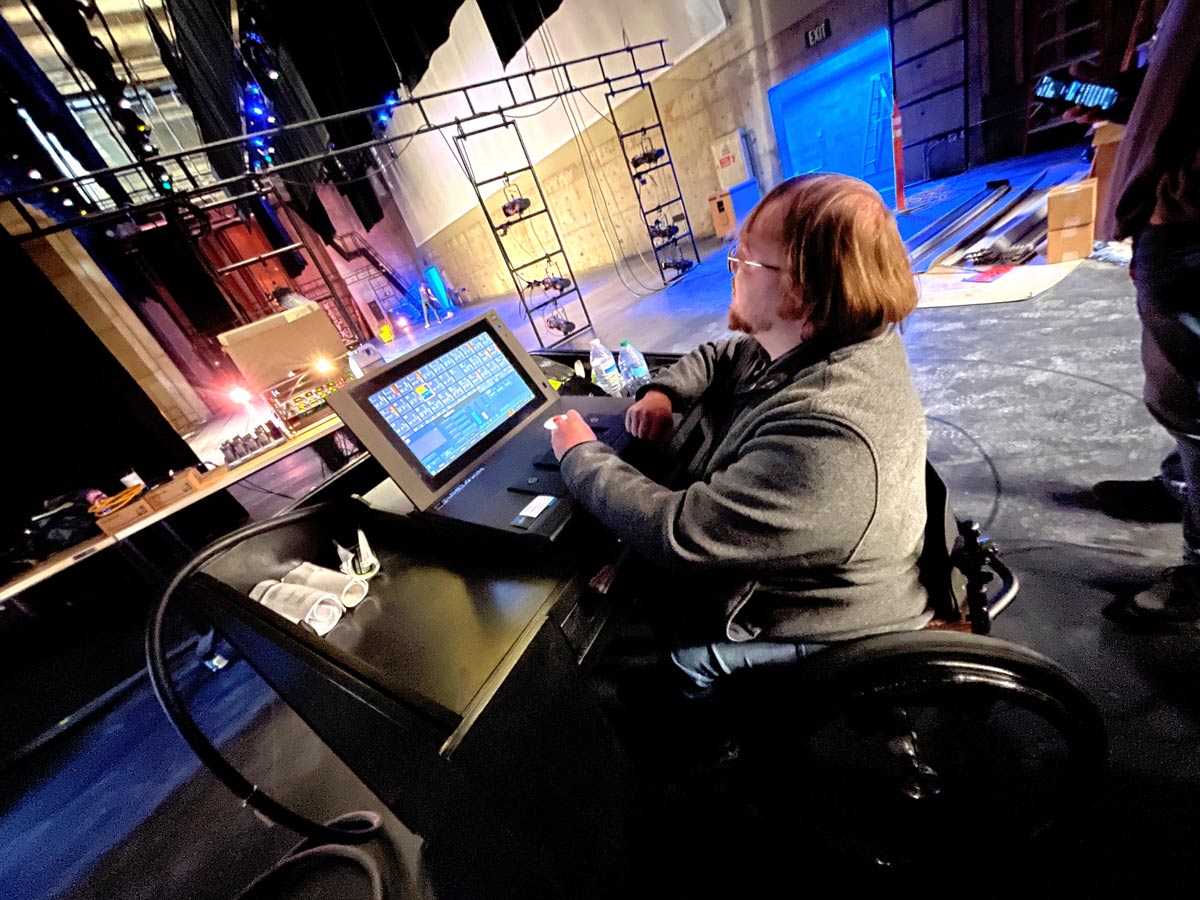
Adjustable height mobile motorized rigging control console. The console is designed to accommodate users with low grip (less than 5lbs of grip/push force required), low visibility (GUI adjustments and high contrast graphics), and mobility challenges. (Photo by author)
Design Strategies:
- Consistent lighting levels and color temperature: Avoid sudden changes that disorient visually impaired users.
- Tactile floor cues: Guide users toward stage entrances and exits.
- Auditory beacons: Use directional sound to assist navigation in low-light conditions.
- Clear sightlines and minimal obstructions: Reduce risk of collision or confusion during fast-paced transitions.
- Assistive door openers.
On-Stage Features
Accessibility on stage supports inclusive casting, crew participation, and community engagement.
Design Strategies:
- Modular ramp systems: Integrate into scenic design for seamless access.
- Stage-edge cane trails: Help visually impaired performers orient themselves spatially.
- In-ear auditory cues: Supplement visual cues for blocking and timing.
- Flooring choices: Use materials that support mobility aids and reduce vibration for sensory-sensitive users.
- Assistive listening zones: Ensure Bluetooth-enabled systems cover the full-stage area.
- Adjustable height control stations such as automated rigging, stage management consoles, or lighting and sound positions that accommodate wheelchair users as well as people with mobility challenges.
Technology Integration
Smart systems can enhance accessibility without disrupting artistic intent.
Recommended Technologies:
- Bluetooth broadcast systems: Allow users to connect hearing aids or devices directly to venue audio.
- RFID or beacon-based wayfinding: Enable personalized navigation for visually impaired staff.
- Mobile control apps: Let users adjust lighting, sound, or environmental settings from their devices.
- Digital signage with real-time updates: Support cognitive accessibility and reduce reliance on verbal instructions.
- Automated technologies that meet both physical and visual adaptability ANSI criteria to be inclusive: Joystick controls operating at less than 5lbs of pressure, accessible E-stops, ability to adjust contrast, color, and font size on control screens, etc.
- User Experience (UX)Design considerations for adaptability of Displays.
Interdisciplinary Strategies for Theatre Designers
Theatre designers play a pivotal role in bridging artistic vision with operational inclusivity. Here’s how:
- Early stakeholder engagement: Include disabled technicians, crew, performers, and the public disability community who may volunteer in design conversations.
- Plan and execute mock-up reviews: Test dressing rooms, shop layouts, and stage transitions with diverse users before finalizing plans.
- Flexible infrastructure: Advocate for modular systems that can evolve with changing needs.
- Training and signage: Ensure staff understand how to support accessible features and technologies.
- Documentation and standards: Create accessibility guidelines tailored to the venue’s operations and production types.
Accessibility backstage and onstage isn’t a checklist, it’s a mindset. Theatre designers have the power to shape environments where every technician, crew member, and performer can contribute fully and safely. By embedding Universal Design into every phase of planning and advising clients and architects with empathy and precision, we move closer to a performing arts ecosystem that truly welcomes all.
By Raymond Kent, ASTC
Disclaimer: Any views or opinions expressed in this article are solely those of the author and do not necessarily represent those of the American Society of Theatre Consultants. This article is for general information only and should not be substituted for specific advice from a Theatre Consultant, Code Consultant, or Design Professional, and may not be suitable for all situations nor in all locations.